 I keep getting error messages about the licence. How do I fix this?
If you get an error message that looks something like this:-
"The encoded file /home/accountname/public_html/support/admin/index.php requires a license file tdp.lic."
It means that you need to download a licence from the licence generator page and FTP it to your Ticket Desk Pro installation. If you've already done that, then check that Windows hasn't renamed the file to tdp.lic.txt which it sometimes decides to do depending on your Windows settings.
Just remove the .txt from the file extension and you should be okay. The best place to do this is on your web server as you can see the true file extension, and not the one that Windows may display.
How do I know if my server has the GD library installed?
To find out if your server has this modules installed you need to view your PHP installation data.
To do this copy and paste the following into a text editor. Save the file as 'test.php' and upload to anywhere on your server. Once uploaded access the 'test.php' file in your browser. You will see a run down of your PHP configuration options. Look for the GD module and see if its enabled.
Here is an example of what you are looking for:
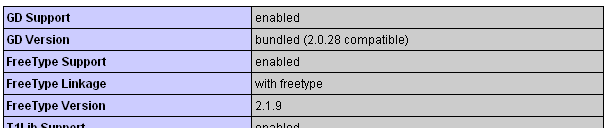
Note that versions may differ. The captcha will not function if this is not enabled. Delete the test file after for security.
I have the GD Library installed, but I see a red cross where the captcha should be. Whats happened?
It could be that something got corrupted during upload. Try re-uploading 'crypt/fonts/' directory again. If that doesn`t resolve the issue, check your server error log. The reason for the captcha not loading should be there.
What is MySQL and how do I set up a MySQL database?
MySQL is a popular database used by many websites and software programs. As set up can vary from server to server, you would be advised to contact your hosting company who will be happy to help.
The system doesn`t appear to be sending mail. What can I do?
It could be that your server is not configured to send mail. Your hosting company can advise you. Also, if you are getting the error on your local server, try the system on a live server before contacting them.
Can I change the text or language in the software?
Yes. Open the 'lang/english.php' file in your text editor.
Does the software support any other options of sending mail than the PHP mail function?
Yes. You can enable SMTP in your settings. If you are unsure of your SMTP settings, contact your hosting company.
Can I use html in my e-mails?
Yes you can. If you want to use HTML in your e-mail templates, you need to do the following:
1. Open up the 'lang/english.php' file in a text editor.
2. Find the following variable on line 32:
define('SET_HTML', 0);
Set this var to 1, save, then re-upload. If you are having problems, revert back to plain text e-mails. Note that if you enable HTML you`ll need to
break the lines in the text files using a standard HTML linebreak. ie: <br>
Does this system support e-mail piping?
No. There are no plans to implement this function in TicketDesk Pro due to severe security issues.
In the admin area, how do I disable the redirect pages to speed up the admin process?
To do this do the following:
1. Open up the 'admin/index.php' file in a text editor.
2. Scroll down until you see the following line:
define('REDIRECT_MESSAGE', 1);
Change this to:
define('REDIRECT_MESSAGE', 0);
3. Save and reupload the index file.
I see 'noreply@yoursite.com' as my return address. Where do I change this?
The reply e-mail address is specified in the settings.
How can I show an offline/online message for when the live support is available?
To do something like this you would need to use either PHP's date functions or Javascript's date objects.
Pseudo code would be something like:
if (date is between these times)
{
offline
}
else
{
online
}
For the PHP date functions visit:
http://www.php.net/date
For the Javascript date objects visit:
http://www.w3schools.com/js/js_obj_date.asp
Can I disable the captcha code?
Captcha is enabled/disabled in the settings.
How can I change the sizes of the Frequently Asked Questions pop up window?
Open up the 'lang/english.php' file and find line 31:
define('FAQ_WINDOW', '500,300');
Values are 'Width,Height' seperated by a comma. Style content for the window can be found in the 'css/gb_styles.css' file.